
Adobe Analytics
Enterprise web and mobile analytics from Adobe, sold by contract
Adobe Analytics offers deep segmentation in Analysis Workspace, raw data feeds and 25 months of history by default. It is sold by contract with no public price, needs specialists to set up, and sets cookies that generally need consent in the EU.
- Price on request
- Deep segmentation
- 25 months of data
- Needs a specialist
We make WireBoard, one of the tools we review. It is scored on the same criteria as every other tool. How we review
Who it suits
A good fit if
- You have analysts who will build their own reports, segments and attribution models.
- You already use Adobe products such as Adobe Target and want the data in one place.
- You need raw hit data delivered to your own warehouse, and years of history.
Look elsewhere if
- You want to start today: there is no public price, and buying goes through Adobe sales.
- You have no analyst or implementation partner to plan and maintain the tagging.
- You want analytics without a consent banner in the EU: it sets visitor ID cookies.
Scores
Above average on features and reporting. Below average on real-time data, privacy, ease of use and pricing.
- Adobe Analytics
- Average of the 18 tools we reviewed
Every tool is scored from 0 to 5 on the same seven criteria, and the overall score is their average. How we score
Why these scores
- Features5.0, average 4.1
- Segments, flow, fallout, cohorts, attribution, anomaly detection, raw data feeds, APIs and Adobe's own integrations.
- Reporting5.0, average 4.1
- Analysis Workspace builds any report with segments anywhere, schedules PDF or CSV exports, and Data Feeds deliver every hit.
- Design4.0, average 3.9
- Analysis Workspace is a flexible drag-and-drop canvas with many chart types, but it is dense and built for analysts.
- Real-time data2.5, average 3.2
- Up to 3 real-time reports per report suite, updated every minute and under 2 minutes behind, but only admins and two permission groups see them.
- Privacy2.5, average 3.2
- Visitor ID cookies by default, but Adobe acts only as a processor and lets you hash or remove IP addresses.
- Ease of use2.0, average 3.8
- Adobe asks for a solution design before tagging, with up to 250 eVars and 75 props to plan. Plan for a specialist.
- Pricing1.0, average 3.6
- No public price. Every package is quoted on contract, by the volume of server calls you commit to.
Key facts
25 months of history, raw data feeds and Adobe acting only as a processor. Against that, cookies by default and no data centre inside the EU.
- Price
- On request, by contract
- Packages
- Select, Prime and Ultimate
- Free plan
- None
- Cookies
- s_ecid for 13 months, s_vi and s_fid for 2 years
- Open source
- No
- Self-hosting
- No
- Data processed in
- Oregon (US), London (UK) or Singapore
- Company based in
- United States (Adobe Inc.)
- Live view
- Up to 3 real-time reports per report suite, updated every minute, for admins and two permission groups
- Report delay
- Complete data about 2 hours after collection
- Data kept for
- 25 months by default, extendable to 10 years and 1 month
- Adobe's role
- Processor only, with IP hashing or removal in the settings
From Adobe Analytics’s own site, checked on .
Pricing
There is no public price. Adobe quotes each package by the traffic you commit to, plus retention and add-ons.
On requestfor the Select, Prime and Ultimate packages, priced by contract
Adobe publishes no prices. A quote depends on the package, on the volume of server calls you commit to (each tracked page view, link or event is one, and copies sent to extra report suites count as secondary calls), on data retention beyond the 25 months included, and on add-ons such as Customer Journey Analytics. Calls above your commitment are billed at the overage rate in your sales order.
Adobe's pricing page lists the packages and sends you to its sales team. Third-party estimates circulate, but Adobe does not confirm any of them.
Our review
What you get
Adobe Analytics is Adobe's web and mobile analytics product, now listed in its CX Analytics catalogue next to Customer Journey Analytics. It collects hits (page views, link clicks, custom events) into report suites. Its centre is Analysis Workspace, a drag-and-drop canvas where you build projects from freeform tables, charts, flow and fallout diagrams, cohort tables and attribution panels, and apply segments to any of them.
Beyond the interface, it hands over the raw data: Data Feeds deliver every hit to your own storage. It connects to Adobe's other products, such as Adobe Target for testing.
Adobe sells it in three packages: Select, Prime and Ultimate. Adobe describes Select as the foundation for understanding website performance, Prime as adding cross-channel views, identity resolution and more AI tools, and Ultimate as the most complete set.
Who it is for
Adobe Analytics is built for large organisations with an analytics team: retailers, banks, airlines, media groups and other companies that run many sites and apps, need years of history, and want to slice every hit by their own business dimensions. It fits best where Adobe's other products are already in place, and where an implementation partner or in-house specialists maintain the tagging.
It does not fit a typical website. A blog, a shop on a hosted platform or a young SaaS product would spend months and a contract on what a free or low-cost tool does in an afternoon. Teams that mainly want product analytics, meaning funnels and retention around signed-in users, usually find Mixpanel or Heap quicker to start. Our enterprise shortlist compares the tools built for large companies.
Setting it up
This is not a script you paste and forget. Adobe asks you to plan first: its documentation tells you to record what each custom variable holds, and the values it takes, in a solution design document. Depending on the package, Adobe's product description allows 200 or 250 eVars (variables that persist, for conversions) per report suite, plus 75 props (traffic variables), to assign.
You then deploy through Adobe's tag manager with the AppMeasurement library or the Web SDK, add Adobe's mobile SDK to your apps, and configure report suites, processing rules, classifications and marketing channels. Basic page views arrive quickly. A full implementation, with variables that match your business, usually takes an analyst or an implementation partner several weeks or more.
Data is not instant. Adobe says complete data typically appears in reports about 2 hours after collection, because processing runs in hourly batches. It names traffic above the volume you committed to as the most common cause of longer delays.
Reports and dashboards
Day to day, people work in Analysis Workspace projects. A freeform table breaks any metric down by any dimension, segment or date range, and breakdowns can be nested several levels deep. Visualisations include line and bar charts, flow (the paths people take), fallout (where they drop out of a sequence), cohort tables, Venn diagrams of segments, and attribution panels that compare models side by side. Anomaly detection flags unexpected changes in a metric.
Segments are the core skill. You build them from hits, visits or visitors, with sequences and exclusions, and apply them to a whole project or to a single table. Analysts usually build curated projects for colleagues who only need to read them. Projects can be shared, or sent on a schedule as PDF or CSV files.
For data outside the interface, Data Warehouse handles requests too large for Workspace, Report Builder fills Excel workbooks, and the APIs feed other tools.
Real time is limited. You can set up to 3 real-time reports per report suite, each with one metric and up to 3 dimensions. Adobe says they update every minute and run less than 2 minutes behind, with another 5 to 10 minutes if the Adobe Target integration (A4T) is on. Only admins and users in the All Report Access and Advanced Reporting permission groups can set them up or view them.
Privacy and your data
Adobe says it acts as a processor: you are the controller and decide what is collected. In a configuration guide published on the website of France's CNIL, Adobe states it pursues no purposes of its own with Adobe Analytics data. Admins can hash or remove IP addresses, or set their last octet to zero, and Adobe says EMEA customers typically have IP obfuscation switched on by default.
Visitors are identified with cookies: s_ecid for 13 months, and s_vi and s_fid for 2 years. s_vi is a third-party cookie on Adobe's omtrdc.net domain unless you collect data through your own domain. Adobe says visitor profiles on its servers are deleted after a year of inactivity.
Adobe's privacy overview lists three data processing locations: Oregon in the United States, London in the United Kingdom, and Singapore. None of them is inside the EU. Data is kept 25 months by default, and Adobe sells yearly extensions up to a total of 10 years and 1 month.
With cookies by default, Adobe Analytics generally needs consent in the EU. The CNIL guide describes a French exception: a configuration, set up with Adobe's paid professional services, that can skip consent at the cost of reduced tracking for visitors who refuse. Whether it applies to your site depends on the law where you operate.
Pricing in practice
Adobe publishes no prices for any package. Its pricing page sends you to sales, and a quote depends on four things: the package, the volume of server calls you commit to (each tracked page view, link or event is one), data retention beyond the 25 months included, and add-ons such as Customer Journey Analytics. Sending the same hit to a second report suite creates secondary server calls, which are billed too. Calls above your commitment are billed at the overage rate in your sales order.
A small site has no practical way in, with no free plan and no self-serve sign-up. A growing product with a few million page views a month can ask for a quote, but should budget for an implementation partner on top of the licence, and compare the result with tools that publish their prices. For a large organisation, the contract is the normal route: set the server-call commitment against real traffic, check the overage rate, and price the retention you need from the start.
Third-party sites publish estimates of what Adobe Analytics costs, but Adobe confirms none of them. Our web analytics pricing comparison covers tools that do publish their prices.
Alternatives to Adobe Analytics
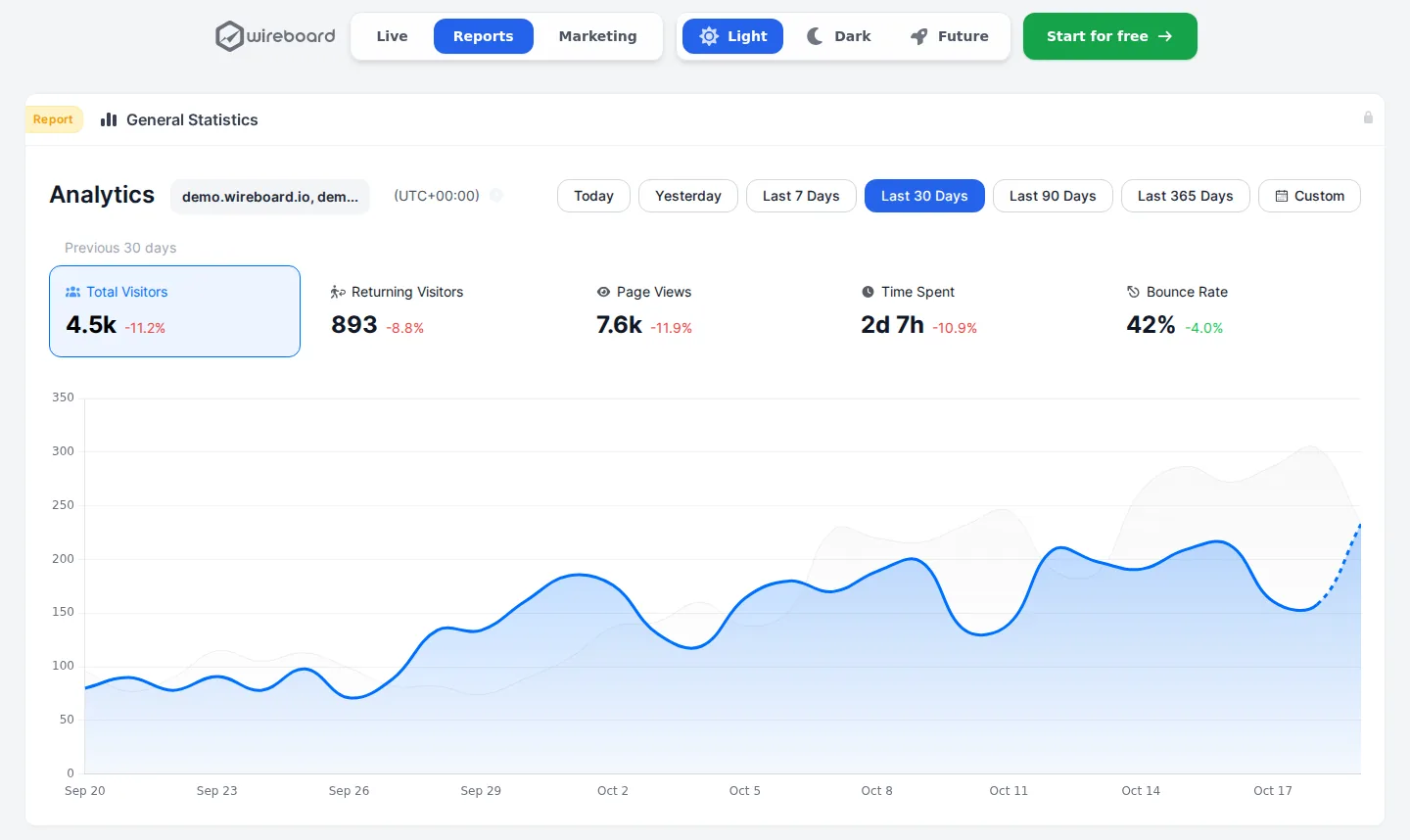
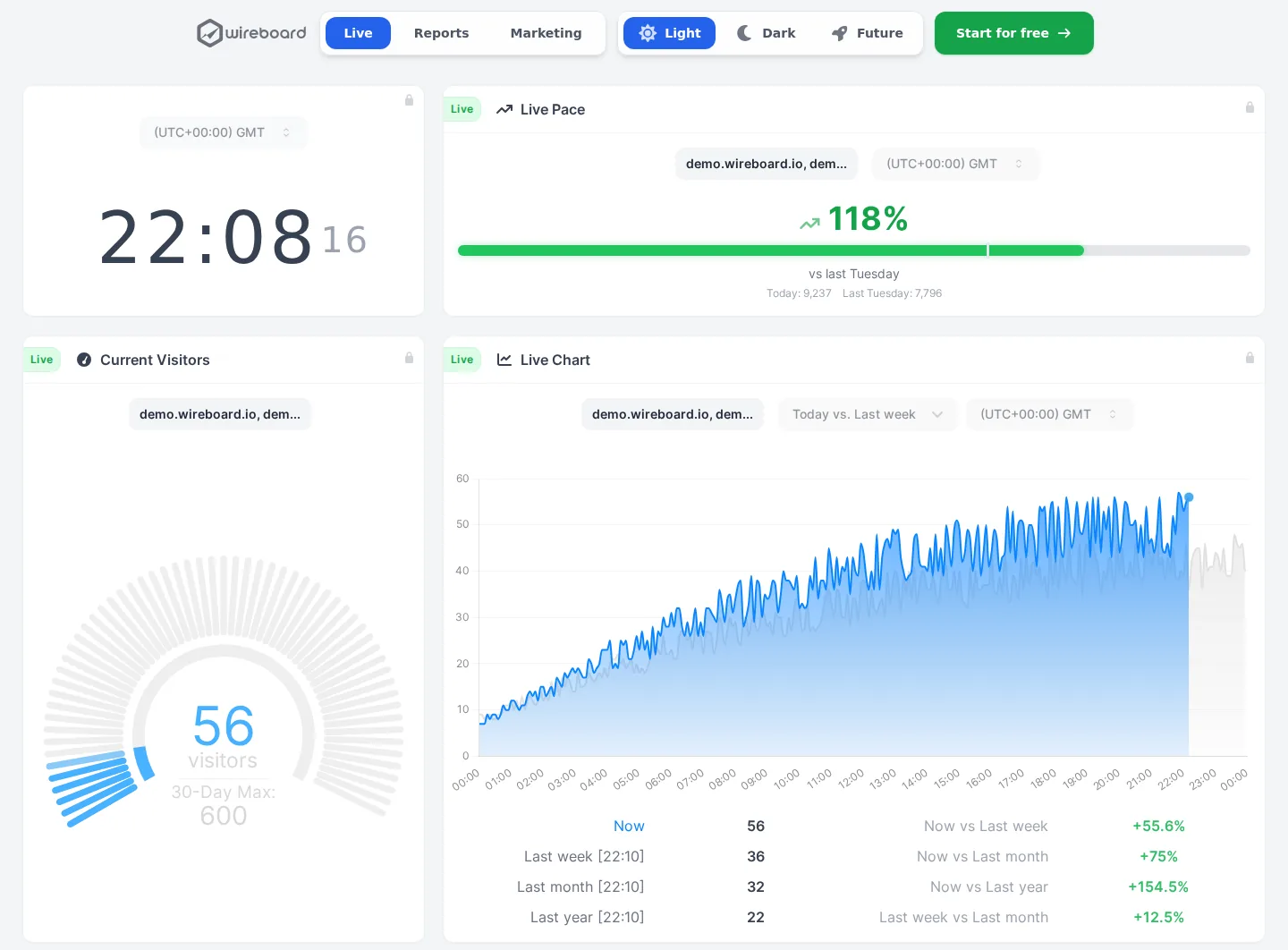
WireBoard (made by us) suits a team whose gap is live data, such as a newsroom that wants a live view everyone can read. Its dashboards update within seconds, add up several sites in one view, and track events, goals, funnels and revenue. It is free for 50,000 pageviews a month on 2 sites, then $9 a month for 100,000 pageviews on 50 sites, with servers in Germany and Finland. It sets cookies by default, with an optional cookieless mode.
Google Analytics is free and covers most of what a typical site needs. Its paid edition, Analytics 360, is Adobe's closest rival and is also sold by contract.
Matomo offers segments, custom reports and ecommerce in open-source software, on its cloud in Frankfurt or on your own servers, so you choose where the data lives.
Mixpanel suits product teams that want funnels, retention and cohorts around signed-in users, with public prices and a free plan for up to 1 million events a month.
Where it falls short
Cost and effort come first. There is no public price and no free plan, buying goes through Adobe's sales team, and the tagging needs planning and specialist work before the first useful report. For a typical website, that is far more than the job needs.
Day to day, Analysis Workspace is built for analysts. People who just want traffic numbers need someone to build curated projects for them. Data takes about 2 hours to be complete, and the real-time reports are limited to 3 per report suite and to a few permission groups.
Privacy takes work too: visitor ID cookies are on by default, one of them can be third-party, and no processing location is inside the EU. Adobe also sells Customer Journey Analytics, a separate product on Adobe Experience Platform. Before you sign, check which of the two a quote covers, and what moving from one to the other would take.
How it compares
Google Analytics 360 is its closest rival, also by contract. Mixpanel and Heap cover user-level analysis with free plans to start, and Matomo can run on your own server.
- Free plan
- Up to 50k pageviews
- Cookieless
- Optional
- Open source
- No
- EU hosting
- Yes
- Free plan
- Up to 1M events a month
- Cookieless
- No
- Open source
- No
- EU hosting
- Your choice
- Free plan
- Self-hosted only
- Cookieless
- Optional
- Open source
- Yes
- EU hosting
- Yes
- Free plan
- Yes
- Cookieless
- No
- Open source
- No
- EU hosting
- No
- Free plan
- Up to 10k sessions a month
- Cookieless
- No
- Open source
- No
- EU hosting
- Your choice
Adobe Analytics (this review)
Starts at On request
3.1out of 5
- Free plan
- No
- Cookieless
- No
- Open source
- No
- EU hosting
- No
- Free plan
- No
- Cookieless
- No
- Open source
- No
- EU hosting
- No





Made by us

WireBoard
See your traffic as it happens, on live dashboards you build yourself. Nearly every feature is on the free plan.
- Visitors, sources and events streamed live
- Several sites in one view, on 60+ widgets
- Events, goals, funnels and revenue on every plan
- Free for 2 sites, $9 a month for 50
- Data processed in Germany and Finland
Questions
How much does Adobe Analytics cost?
Adobe does not publish prices. You get a quote for the Select, Prime or Ultimate package, based on the server calls you commit to, retention beyond 25 months and any add-ons. Calls above your commitment are billed at the overage rate in your contract. Figures you find on third-party sites are estimates that Adobe does not confirm.
Is Adobe Analytics free?
No. Adobe has no free plan and no self-serve sign-up. Every package (Select, Prime and Ultimate) is sold by contract through Adobe's sales team. If you want deep analysis without a contract, Google Analytics is free, Matomo is free to run on your own server, and Mixpanel has a free plan for up to 1 million events a month.
Adobe Analytics or Customer Journey Analytics?
Both are Adobe products. Adobe Analytics collects web and app data into report suites. Customer Journey Analytics runs on Adobe Experience Platform and is built to join data from many channels. Adobe sells it on its own and as an add-on to Adobe Analytics, so ask which one a quote covers.
Does Adobe Analytics need a cookie banner?
In the EU, generally yes, because it identifies visitors with cookies kept 13 months to 2 years. A configuration guide published on the website of France's CNIL says Adobe Analytics can qualify for the French consent exemption for audience measurement, but only when set up with Adobe's paid professional services, and with reduced tracking for visitors who do not consent.
Where is Adobe Analytics data stored?
Adobe's privacy overview lists three data processing locations, in Oregon in the United States, London in the United Kingdom, and Singapore. None of them is inside the EU. Adobe says it acts as a processor on your instructions and lets admins hash or remove IP addresses, and that EMEA customers typically have IP obfuscation switched on by default.
Is Adobe Analytics real time?
Only in part. You can set up to 3 real-time reports per report suite, each with one metric and up to 3 dimensions, which Adobe says update every minute and run less than 2 minutes behind. Only admins and users in two permission groups can see them. The other reports typically show complete data about 2 hours after collection.
How long does Adobe Analytics keep data?
25 months by default. Adobe sells extensions one year at a time, up to 8 of them, for a maximum of 10 years and 1 month, and shortening the period costs nothing. Adobe also says it can provide a historical dump of raw, hit-level data, so you can keep your own copy before older data is deleted.
Adobe Analytics or Google Analytics?
The free Google Analytics covers most of what a typical site needs, at no cost. Adobe Analytics competes with Google's paid Analytics 360, and both are sold by contract. Adobe processes your data only on your instructions, where Google can use it for its own products if you allow it. Adobe keeps 25 months of data by default, where the free Google Analytics keeps event-level data for explorations for 14 months at most.
About this review
First published on . Facts and prices checked on against Adobe Analytics’s own site.
Analytics Alternative is run by SwissOps, which also makes WireBoard, one of the tools on this site. WireBoard is scored on the same seven criteria as every other tool. How we review
Where the facts come from:
- business.adobe.com/products/adobe-analytics/pricing.html
- business.adobe.com/products/analytics/compare-adobe-analytics-packages.html
- helpx.adobe.com/legal/product-descriptions/adobe-analytics.html
- experienceleague.adobe.com/en/docs/analytics/technotes/data-retention
- experienceleague.adobe.com/en/docs/analytics/technotes/latency
- experienceleague.adobe.com/en/docs/analytics/components/real-time-reporting/realtime
- experienceleague.adobe.com/en/docs/core-services/interface/data-collection/cookies/analytics
- experienceleague.adobe.com/en/docs/analytics/technotes/privacy/privacy-overview
- experienceleague.adobe.com/en/docs/analytics/components/dimensions/evar
- cnil.fr/sites/cnil/files/2024-11/adobe_analytics_configuration_guide_final.pdf
Spotted something out of date? Tell us.